Enter forum description here ...
No similar topics found.


+2
Fixed
 "Enter Time" Bug - Can't batch process
The "Enter Time" popup where you can add multiple entries doesn't seem to work correctly. Attached is a screenshot explaining the issue encountered.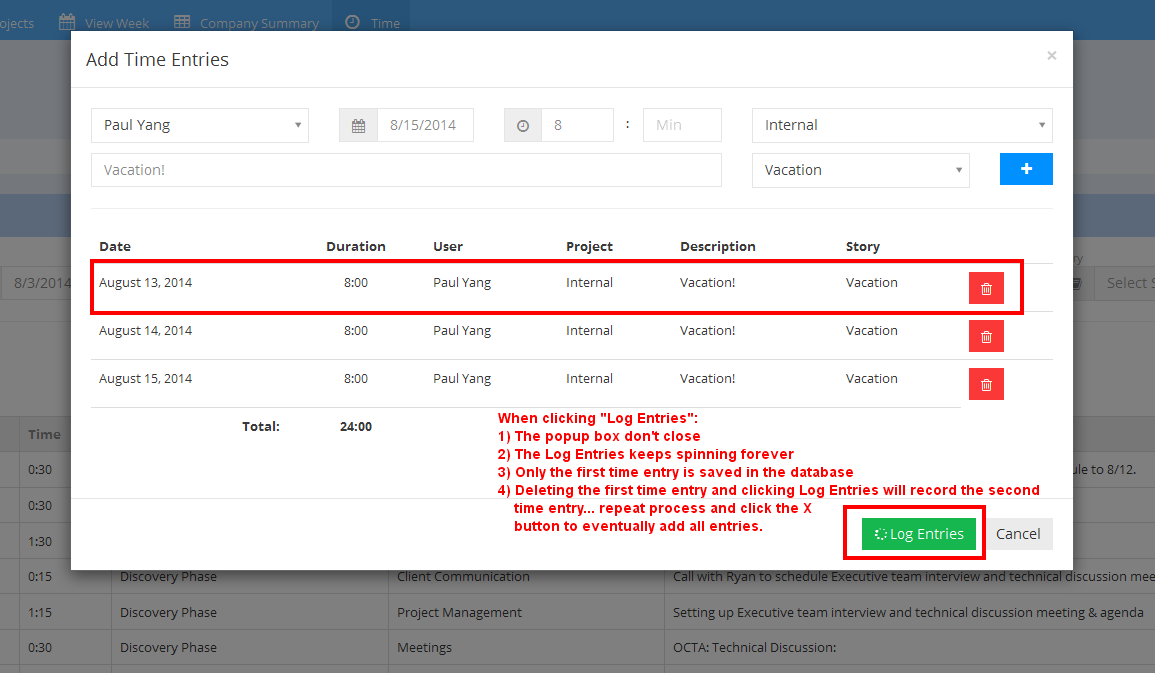

+2
Fixed
Manual time entries don't always show up on time page
Time entry shows logged July 7, but if I filter July 7 - July 7 the time entry doesn't show up. It only shows up if I filter July 7 - July 8 for example.

+2
Completat
 Button on calendar cards to quickly log time
Ability to click on a calendar entry, select a project and have time logged.

+2
Thanks
Calendar Hastag Love
The calendar hashtag addition is fantastic and works great :) Just wanted to send some praise your way!

+2
Fixed
Export to Excel on the Time Tab
Upon initially going to the Time tab, if you click on 'Export to Excel', this works fine.
Once you use the filters and then try clicking on 'Export to Excel', the excel file that gets generated is a blank file.
Once you use the filters and then try clicking on 'Export to Excel', the excel file that gets generated is a blank file.
+1
Under review
View Week: Updating Zimbra Appointment Clears Time From Screen
View Week Screen:
If a Zimbra appointment get's updated that you have already marked as 'logged time' in DP, the time will disappear from the View Week Screen BUT will still be in the system. (Example: Last week I had 40 hours. Now, that a couple of appointments have been updated with the new hastag, the View Week shows me at 38:17 instead of the original 40, but the Time tab still has me on 40)
My concern is that if someone see't their time on the View Week tab they will enter it in again, and we will have duplicates.
If a Zimbra appointment get's updated that you have already marked as 'logged time' in DP, the time will disappear from the View Week Screen BUT will still be in the system. (Example: Last week I had 40 hours. Now, that a couple of appointments have been updated with the new hastag, the View Week shows me at 38:17 instead of the original 40, but the Time tab still has me on 40)
My concern is that if someone see't their time on the View Week tab they will enter it in again, and we will have duplicates.
+1
Fixed
Export to Excel -> Sum of hours is not calculating correctly
Note the Time Used is showing 10 hours:
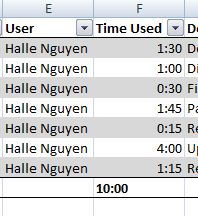
But the total time is actual 10:15 as shown here:

The formula showing is: =TEXT(SUM([Time Used]), "[h]:ss")
It should be: =TEXT(SUM([Time Used]), "[h]:mm")
But the total time is actual 10:15 as shown here:
The formula showing is: =TEXT(SUM([Time Used]), "[h]:ss")
It should be: =TEXT(SUM([Time Used]), "[h]:mm")
+1
Weekly Email Reminder for Time Entry
A request has been made to bring back an email similar to the PaulBot emails. The Paulbot emails really assisted in getting the whole team to enter their time into the system, and I think we need to bring it or something similar back,
Customer support service by UserEcho