Enter forum description here ...
No similar topics found.

+1
Under review
 View Week: Updating Zimbra Appointment Clears Time From Screen
View Week Screen:
If a Zimbra appointment get's updated that you have already marked as 'logged time' in DP, the time will disappear from the View Week Screen BUT will still be in the system. (Example: Last week I had 40 hours. Now, that a couple of appointments have been updated with the new hastag, the View Week shows me at 38:17 instead of the original 40, but the Time tab still has me on 40)
My concern is that if someone see't their time on the View Week tab they will enter it in again, and we will have duplicates.
If a Zimbra appointment get's updated that you have already marked as 'logged time' in DP, the time will disappear from the View Week Screen BUT will still be in the system. (Example: Last week I had 40 hours. Now, that a couple of appointments have been updated with the new hastag, the View Week shows me at 38:17 instead of the original 40, but the Time tab still has me on 40)
My concern is that if someone see't their time on the View Week tab they will enter it in again, and we will have duplicates.

+1
Under review
Can't add a new story with same text as another story
I can't add a new story if the text of the new story has the same text as another.
Example: FenceScreen already has a story for "Request a Quote Form Bug" - if I want to add a new story "Request a Quote", I'm not able to since the "add new story" option doesn't come up until the story name I am typing is not contained within the suggested stories.
Example: FenceScreen already has a story for "Request a Quote Form Bug" - if I want to add a new story "Request a Quote", I'm not able to since the "add new story" option doesn't come up until the story name I am typing is not contained within the suggested stories.
+1
Under review
 Time->Enter Time->Be able to tab and then type in dropbox
On the Add Time Entries modal, I would like the ability to tab through and when you get to a drop box be able to start typing without having to click in the drop box with my mouse.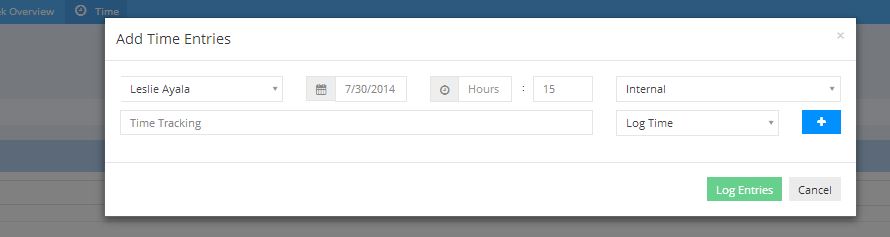

0
Under review
Calendar time logging issue
For some reason the time I log for the "MM db server upgrade" on http://dirtypop.w2.wadev.com/c/web-advanced/card/viewweek#/begin=03/15/2015&viewState=W3sidmlld1R5cGUiOiJ1c2VyIiwicGFyYW0iOnsiaWQiOiIxMCIsIm5hbWUiOiJSZWJlY2NhIE1hZXNzZW4ifSwic2F2ZWQiOnRydWV9LHsidmlld1R5cGUiOiJ1c2VyIiwicGFyYW0iOnsiaWQiOiI2IiwibmFtZSI6IkFkYW0gQm9ubmVyIn0sInNhdmVkIjp0cnVlfV0= doesn't get stored. To reproduce: log time on calendar event, refresh page.

0
Started
More information in Notification emails
Notification emails are awesome, but they would be much more helpful with the following information:
Thanks!
- Date information (what day was it originally scheduled for?)
- Hours - amount entered and amount completed when noti sent
- User information (who was assigned, and (if known) who changed the status)
Thanks!

0
Planned
Show list of cards / time entries on a story's detail page
While browsing a project's stories, you can see that some have open cards but there is no way to find out what cards those are.
Reuse whatever is possible from time searching to display the entries for a story.
Reuse whatever is possible from time searching to display the entries for a story.
0
Started
Add Previous Week & Next Week buttons to the bottom of the View Week Screen
Suggestion:
Reproduce the Previous Week & Next Week buttons on the bottom of the View Week button.
Reason:
I have about 6 people saved on my View Week. It would be nice to go forward and back a week without having to scroll back up to the top of the page
Reproduce the Previous Week & Next Week buttons on the bottom of the View Week button.
Reason:
I have about 6 people saved on my View Week. It would be nice to go forward and back a week without having to scroll back up to the top of the page
0
Under review
Time Screen: Project Dropdown: 'x' issue when project name is too long
Note that if the project name is to long the 'x' to clear the field is obscured under the 'story' drop down:


0
Planned
Time Tab - Calendar defaulting to 1900s when entering date in the mm/dd/yy format
On the time tab, when typing in date range using the last 2 digits of the year, the calendar defaults to the 1900's.
From: 01/01/15
To: 01/31/15
The calendar goes to 01/01/1915 to 01/31/1915.
Can we make it default to the 21st century? :)
From: 01/01/15
To: 01/31/15
The calendar goes to 01/01/1915 to 01/31/1915.
Can we make it default to the 21st century? :)

0
Under review
Updatable Project Names
Can't seem to update project name from "Project Settings" page. The name is greyed out but editble. Clicking on submit results in a sucessful save but the project name isn't changed.
For the immediate purpose, need to change OCTA > Technology Audit to Technical Discovery
For the immediate purpose, need to change OCTA > Technology Audit to Technical Discovery
Customer support service by UserEcho